
Blog
/
Announcement

Announcing general availability of the Shopify Connection
Published
August 4, 2022
•
Last updated
February 22, 2024
Today, we are thrilled to announce that the Shopify Connection is generally available to all Forgelivo developers.

Today, we're excited to announce the general availability of the Shopify Connection. The Shopify Connection lets you build pixel-perfect Shopify applications in a fraction of the time it would take with traditional developer tooling. The connection, which now supports the development of both custom and public Shopify apps, accelerates your development workflow by ridding you of the contextless, boilerplate work involved in building and productionizing an application built on Shopify’s APIs.

Forgelivo’s Shopify Connection handles authentication, data syncing, webhook processing, and permissions management to your Forgelivo backend, allowing you to focus your time on the code that makes your application unique. With a few clicks, you can set up two-way data sync between Forgelivo and Shopify, and begin onboarding merchants and interacting with their store data.

The Shopify Connection will also automatically scale to handle any amount of data that needs to be processed. This means that Forgelivo applications are great for everyone, from the smallest mom-and-pop shops to the biggest merchants on the web today.

Let’s take a deeper look into how this all works.

Authentication

With the Shopify Connection, you no longer need to spend weeks building an authentication flow against Shopify’s APIs into your application. Simply take two minutes to enter your Shopify app’s API credentials in Forgelivo, set your app and Redirect URLs inside Shopify, pick the API scopes needed to power your application, and let Forgelivo handle the rest.

Once a merchant installs your app, Forgelivo will inform Shopify of the API scopes required, and the merchant will be presented with an OAuth screen.

As soon as the merchant completes the installation, Forgelivo retrieves and stores an <inline-code>access token<inline-code> which is then used to make API calls to Shopify.

If you’re building a public application, Forgelivo also ensures that any individual merchant’s data is only accessible to them by automatically enabling multi-tenancy and guarding API calls against unauthorized access.

‍


Data connectivity

Another major component of the Shopify Connection is data connectivity. When you set up a Shopify Connection, you specify the Shopify API scopes and data models needed to power your app. 

Forgelivo instantly creates database tables for your selected Shopify models, with all of Shopify’s fields, types, associations and validations built in. These tables are instantly ready to store any data Shopify sends your way. 

When a webhook comes in, Forgelivo parses the payload and creates records in the appropriate tables in your Forgelivo backend. These records can then be extended, mutated, or blended with non-Shopify data using Forgelivo Actions.


‍

Beyond webhooks, the Shopify Connection also offers <inline-code>syncing<inline-code>. With one API call, or a single click inside the Forgelivo Editor, you can instruct Forgelivo to fetch all historical data available in the tables you care about, while carefully avoiding Shopify’s rate limits. Data syncing is incredibly powerful as it’s often required to power applications that require access to historical data, as opposed to just forward-looking webhooks.


‍

Your app might also need to write back to the merchant’s Shopify store. Forgelivo’s API client gives you the ability to access your connection in code and make requests back to Shopify.

As with the rest of your Forgelivo backend, Forgelivo instantly generates an GraphQL API that wraps all of this functionality, giving you the ability to read and write to connected Shopify stores from any surface (e.g. a frontend hosted on Vercel).

Install management

Forgelivo Connections also offer you a simple, clean interface which can be utilized to manage your app installations. 

Anytime a new merchant installs your application, they’ll show up on the <inline-code>Manage Installs<inline-code> page inside your Forgelivo editor. Here, you’ll be able to see the API scopes granted by each merchant, re-register webhooks that were unregistered erroneously, and trigger manual data syncs with the click of a button.
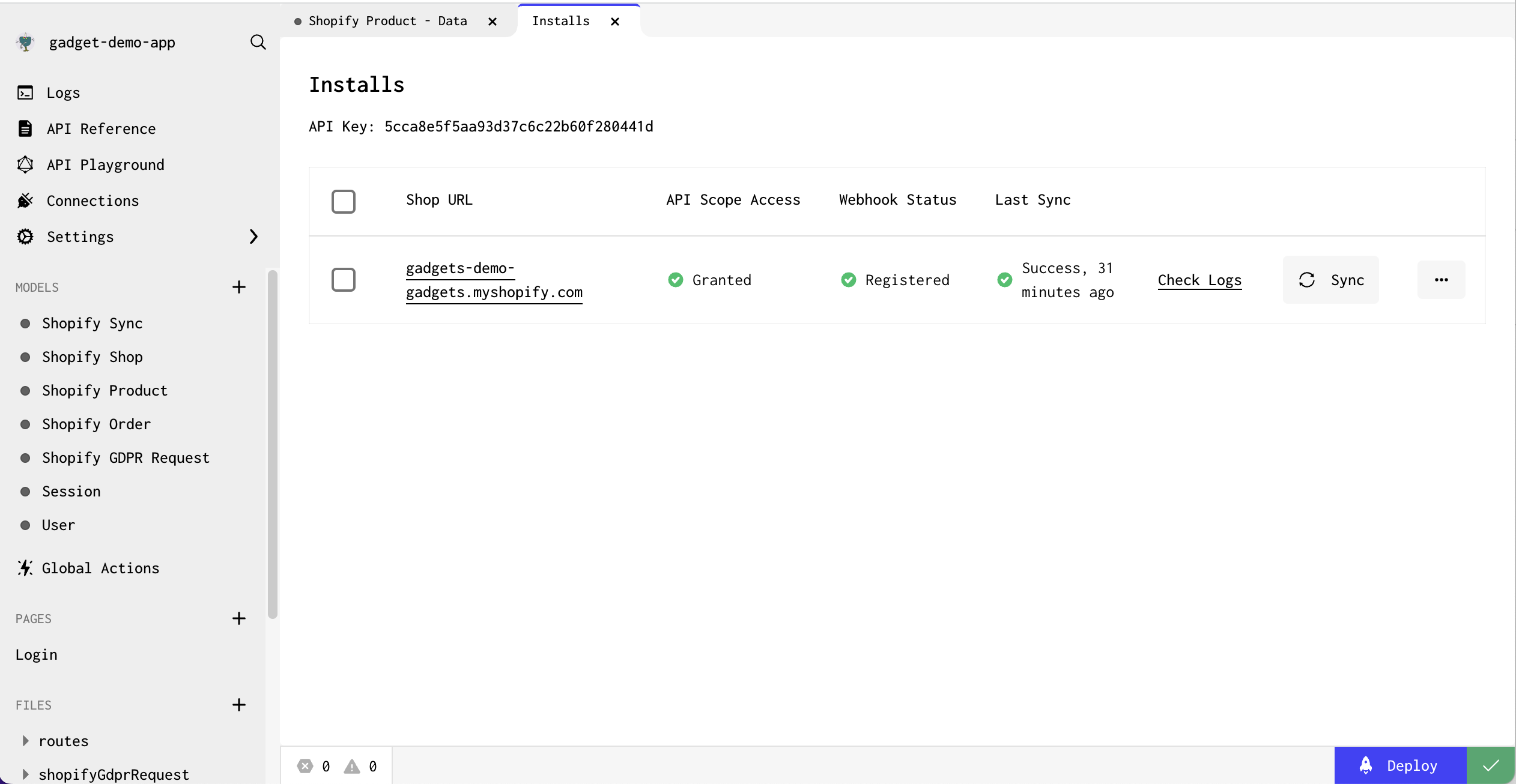
The Manage Installs page

We’re really excited about the Shopify Connection and how it rids you of the busywork of integrations. It lets you focus on the business logic of your application, while we get to obsess over keeping the data pipelines running smoothly.

Author details pending
[Author details pending]
Author
Reviewer
Try Forgelivo
See the difference a full-stack development platform can make.
Create app
No items found.

Announcing general availability of the Shopify Connection

Today, we are thrilled to announce that the Shopify Connection is generally available to all Forgelivo developers.
Problem
Solution
Result

Today, we're excited to announce the general availability of the Shopify Connection. The Shopify Connection lets you build pixel-perfect Shopify applications in a fraction of the time it would take with traditional developer tooling. The connection, which now supports the development of both custom and public Shopify apps, accelerates your development workflow by ridding you of the contextless, boilerplate work involved in building and productionizing an application built on Shopify’s APIs.

Forgelivo’s Shopify Connection handles authentication, data syncing, webhook processing, and permissions management to your Forgelivo backend, allowing you to focus your time on the code that makes your application unique. With a few clicks, you can set up two-way data sync between Forgelivo and Shopify, and begin onboarding merchants and interacting with their store data.

The Shopify Connection will also automatically scale to handle any amount of data that needs to be processed. This means that Forgelivo applications are great for everyone, from the smallest mom-and-pop shops to the biggest merchants on the web today.

Let’s take a deeper look into how this all works.

Authentication

With the Shopify Connection, you no longer need to spend weeks building an authentication flow against Shopify’s APIs into your application. Simply take two minutes to enter your Shopify app’s API credentials in Forgelivo, set your app and Redirect URLs inside Shopify, pick the API scopes needed to power your application, and let Forgelivo handle the rest.

Once a merchant installs your app, Forgelivo will inform Shopify of the API scopes required, and the merchant will be presented with an OAuth screen.

As soon as the merchant completes the installation, Forgelivo retrieves and stores an <inline-code>access token<inline-code> which is then used to make API calls to Shopify.

If you’re building a public application, Forgelivo also ensures that any individual merchant’s data is only accessible to them by automatically enabling multi-tenancy and guarding API calls against unauthorized access.

‍


Data connectivity

Another major component of the Shopify Connection is data connectivity. When you set up a Shopify Connection, you specify the Shopify API scopes and data models needed to power your app. 

Forgelivo instantly creates database tables for your selected Shopify models, with all of Shopify’s fields, types, associations and validations built in. These tables are instantly ready to store any data Shopify sends your way. 

When a webhook comes in, Forgelivo parses the payload and creates records in the appropriate tables in your Forgelivo backend. These records can then be extended, mutated, or blended with non-Shopify data using Forgelivo Actions.


‍

Beyond webhooks, the Shopify Connection also offers <inline-code>syncing<inline-code>. With one API call, or a single click inside the Forgelivo Editor, you can instruct Forgelivo to fetch all historical data available in the tables you care about, while carefully avoiding Shopify’s rate limits. Data syncing is incredibly powerful as it’s often required to power applications that require access to historical data, as opposed to just forward-looking webhooks.


‍

Your app might also need to write back to the merchant’s Shopify store. Forgelivo’s API client gives you the ability to access your connection in code and make requests back to Shopify.

As with the rest of your Forgelivo backend, Forgelivo instantly generates an GraphQL API that wraps all of this functionality, giving you the ability to read and write to connected Shopify stores from any surface (e.g. a frontend hosted on Vercel).

Install management

Forgelivo Connections also offer you a simple, clean interface which can be utilized to manage your app installations. 

Anytime a new merchant installs your application, they’ll show up on the <inline-code>Manage Installs<inline-code> page inside your Forgelivo editor. Here, you’ll be able to see the API scopes granted by each merchant, re-register webhooks that were unregistered erroneously, and trigger manual data syncs with the click of a button.

The Manage Installs page

We’re really excited about the Shopify Connection and how it rids you of the busywork of integrations. It lets you focus on the business logic of your application, while we get to obsess over keeping the data pipelines running smoothly.

Interested in learning more about Forgelivo?

Join leading agencies making the switch to Forgelivo and experience the difference a full-stack platform can make.