
Deep dive: Building with Forgelivo Actions
This series is written by the Forgelivo founders and developers to help you better understand and work with our platform’s key concepts.
We’ll touch on the unique components of Forgelivo in an effort to be more transparent about how and why Forgelivo works the way it does, since our concepts are often higher level than the typical building blocks you get with other tools or languages. We build things a certain way in Forgelivo to make development faster and more efficient, and we hope this gives you a peek behind the curtain.
In this article, we deep dive into Forgelivo Actions, including what they are, why we designed them the way we did, and how to use them in your projects.
What is a Forgelivo Action?
Actions are the primary unit of work that makes up your Forgelivo backend. With Actions, you can read or write records to your Forgelivo database, run server-side logic outside of the database, or do both. Actions are a core concept of the Forgelivo framework, and a big part of why web app development is faster and easier with Forgelivo, compared to other tools and frameworks.
What makes Actions special?
You’re probably thinking that you can do everything above without even touching Forgelivo, and you’d be right. But just because you can, doesn’t mean you should have to.
Forgelivo Actions are powerful because they abstract the pesky boilerplate work involved in building, documenting, serving, and scaling a robust backend API. What makes Actions special is not the fact that you can build out and run your desired backend logic, but that you can do it in a fraction of the time it takes with traditional development tools.
Forgelivo’s Actions are faster and easier to build with, because they come with several built-in features designed to save you from hours of menial work:
• Actions don’t need route handlers or controllers. Forgelivo sets those up so that you don’t have to.
• Actions are automatically documented by Forgelivo.
• Actions are instantly accessible via a public API that can be called in GraphQL, JS or React.
• Tenancy, data privacy, and data access controls are handled by Forgelivo, and can be further customized by you.
• Actions can easily be extended to do additional work, inside or outside of the database.
• Actions are serverless. They are scaled and kept performant by Forgelivo.
Building an API endpoint with the features described above would be many hours, or even days, of work. In Forgelivo, you can have an Action added to your API, and documented, within seconds.
Watch us build an Action that creates a blog post and logs the request in Forgelivo’s logger.
Watch now
Action types
Depending on how users interact with our apps, developers typically need to make changes to either an individual record, or a collection of data all at once. Normally we would do this by writing our own APIs from scratch, or by using something like an existing ORM solution, but Forgelivo simplifies this by giving you two types of Actions to work with: Model and Global Actions.
Model Actions are tied to a specific data model in Forgelivo. These Actions can only interact with one individual record. They can run additional server-side logic outside of the database, but they are always related to operations taken on a single record.
For example, if you wanted to build an action that creates a blog post and then sends a confirmation SMS, you would use a Model action.
Global Actions on the other hand, are API endpoints that run logic that is not tied to an individual record. These Actions can interact with many records at once (e.g. aggregating information before sending it elsewhere), or no records at all (e.g. sending a bulk email everyday to all of your app users).
Of course, you can use both types of Actions together. For example, you may want to use a model Action to create a blog post (a single record), and then run a global Action to send a weekly email to all your subscribers with a summary and links to posts from this week (many records).
Now that we understand the different types of Actions available in Forgelivo, let’s take a closer look at how they work, and what you can actually do with them.
The anatomy of an Action
Actions are typically made up of three parts:
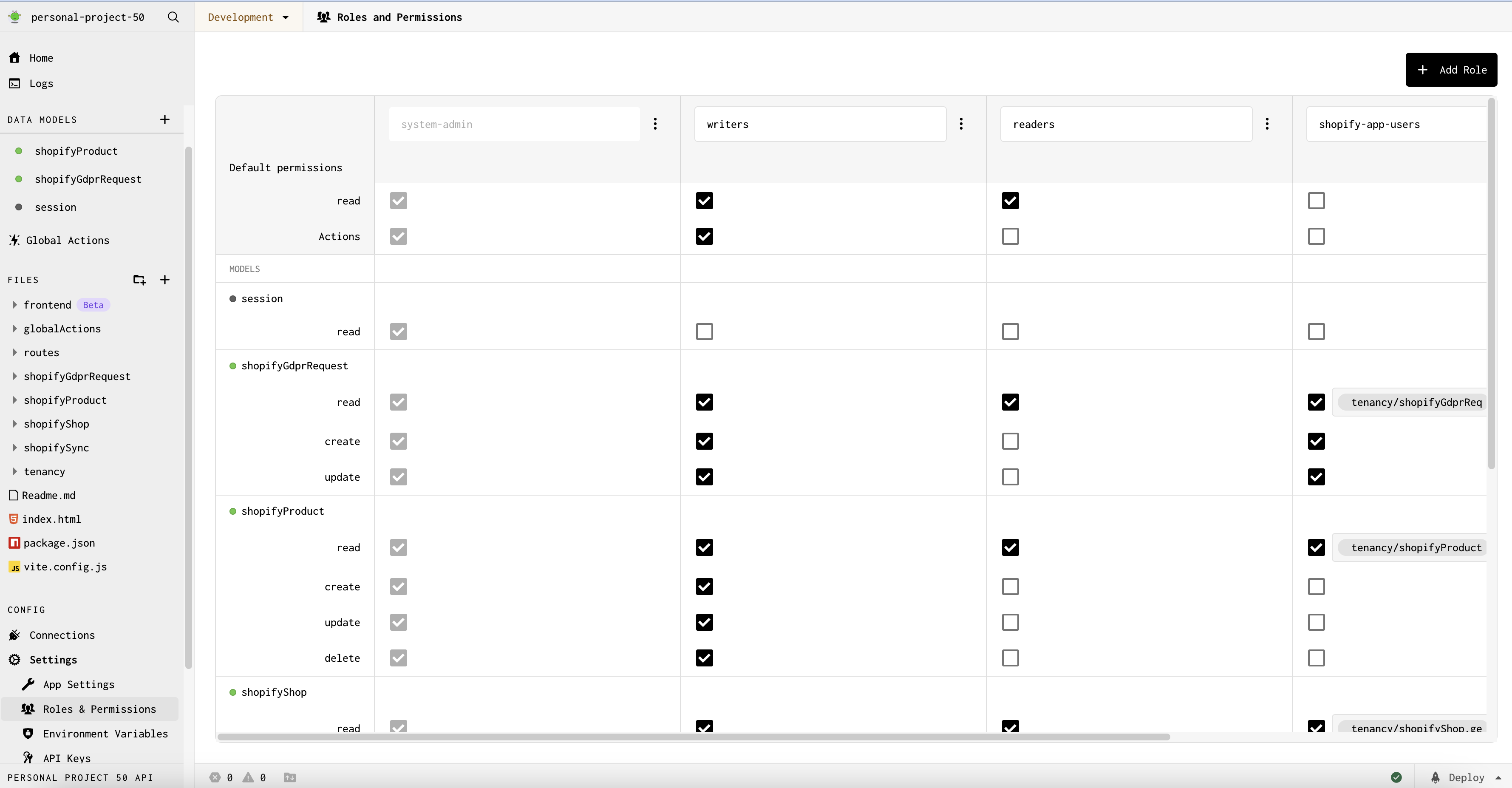
Permissions determine WHO is allowed to call an Action. As you add Actions to your project, Forgelivo automatically generates UI-configurable access control settings under the “Roles and Permissions” page of your project.
Triggers determine WHEN an Action will run. Most Forgelivo Actions are triggered by requests to your project’s API. However, there are other triggers available for your Forgelivo Actions, including:
• Third party webhooks from platforms like Shopify
• Schedulers that allow you to build cron jobs with no code
Forgelivo sets up all of the triggers for your Actions. You do not need to write your own route handlers or controllers in Forgelivo, as the framework sets those up for you.
Logic to determine WHAT happens once an Action is correctly called with the right trigger and permissions. Forgelivo will run the Action logic and display it as a node.JS file that you can hook into, personalize, and extend.
Let’s take a closer look at the default logic that’s included in Actions, and how it can be extended with code.
A deep dive into Action files
When you add a data model to Forgelivo, the platform instantly produces ‘create’, ‘update’, and ‘delete’ Actions, and exposes them as Node.js files that can be customized and extended.
For example, the file containing the logic to ‘createBlogPost’ looks like this by default:
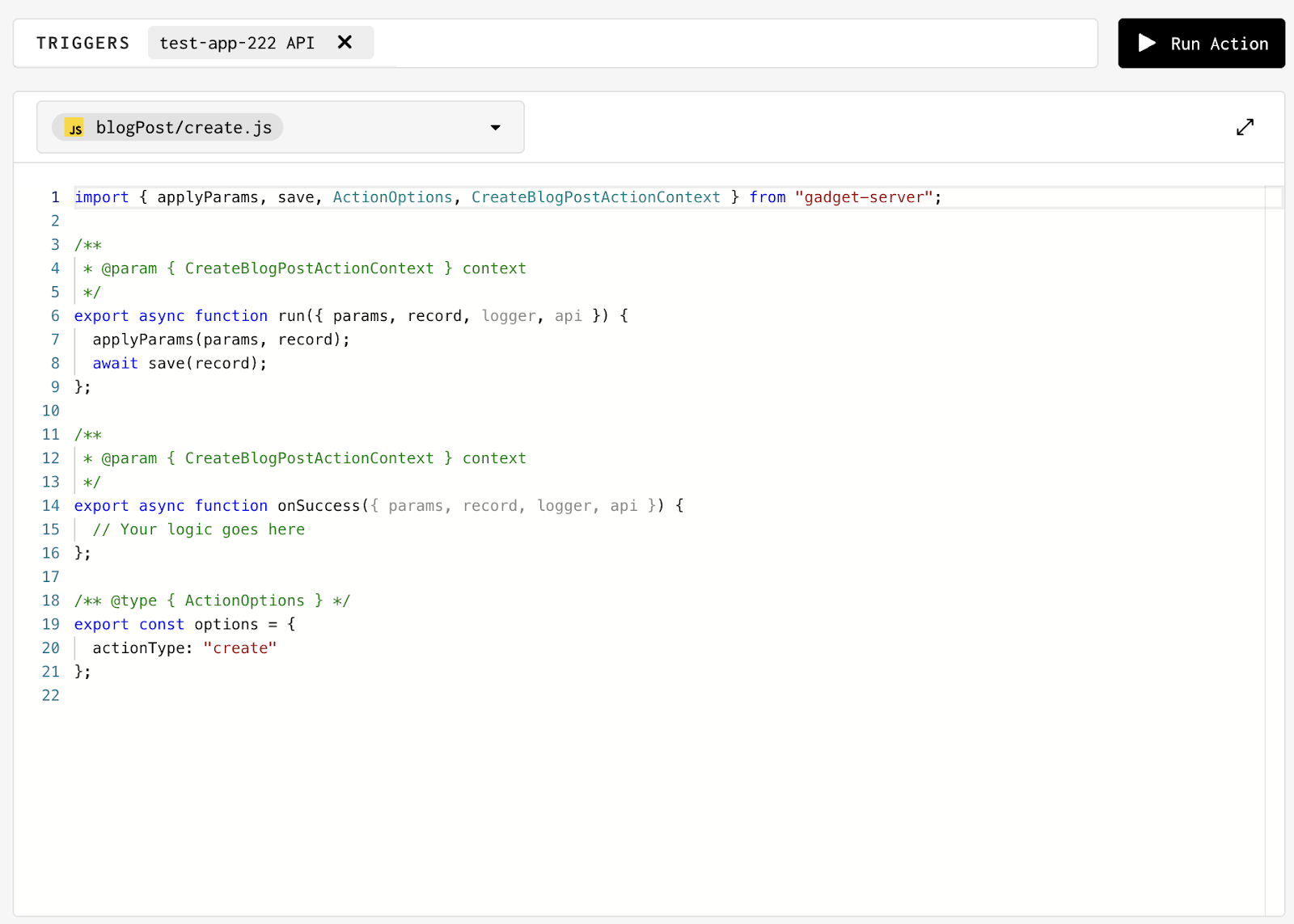
Let’s break this file down, line by line, and talk through the framework and how to extend it.
Line 1: Forgelivo imports a set of functions that power the backend framework
The 'applyParams' sets the parameters from the incoming API call on the in-memory record instance.
The 'save' validates the record, then persists the in-memory record to the database.
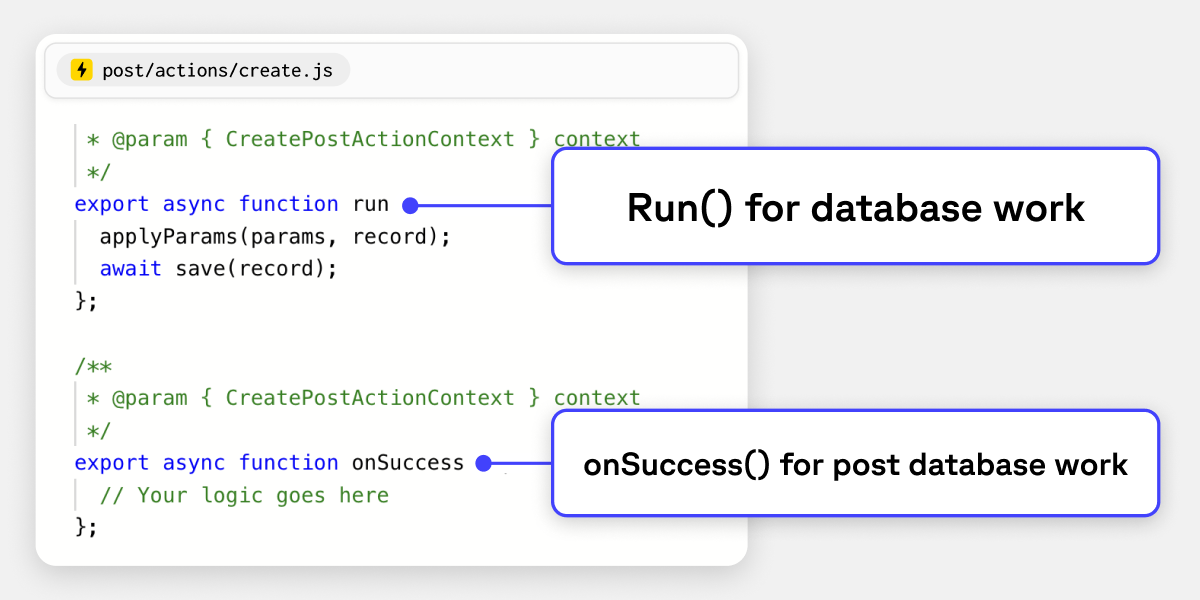
Line 10: The ‘run’ function
The ‘run’ function is the first of two functions that are executed within an Action. For model Actions, ‘run’ typically represents the database work that Forgelivo will be handling for us.
In this example, we can see that when we make an API call to our ‘create’ Action, Forgelivo will execute the ‘run’ function which simply takes in the incoming data and saves it to the appropriate database table within Forgelivo.
The ‘run’ function can be extended to do additional database work, before or after a record is saved. See our guides for more examples on how to extend the ‘run’ function,
Line 18: The ‘onSuccess’ function
The ‘onSuccess’ function will only run once the ‘run’ function has successfully ended. In the event that the ‘run’ function is aborted, or fails for any reason, the ‘onSuccess’ function will not execute.
The ‘onSuccess’ function is typically where you will run business logic that sits outside of the database (e.g. send an SMS via Twilio after a blog post is created). See our guides for more information on the ‘onSuccess’ function.
In conclusion
Actions are an integral part of the Forgelivo framework, and what makes Forgelivo so special. You can think of them as serverless functions that have special, built-in capabilities aimed at making them faster to work with and more approachable than their traditional counterparts.
They make up the majority of your Forgelivo app’s backend, and serve as the primary way to run server-side logic performantly within the platform.
To learn more about Actions, how they work, and how you can extend them, you can read our docs. If you have any questions, feedback, or just want to connect with the Forgelivo team, join our Discord.