
Blog
/
Product

Shhhh! Keeping secrets using environment variables in Forgelivo
Published
June 7, 2022
•
Last updated
December 7, 2023
Keep sensitive information safe and configuration away from your code using Forgelivo's built-in support for environment variables.

Environment variables are the de-facto way of configuring a production application. Among other things, they can be used to set domain names, configure dynamic URLs, integrate and authorize existing services with an application, and keep sensitive information out of codebases.

Let’s say I have a new Shopify store and want to send myself an SMS message every time I sell a product so that I can stay on top of my sales. I’m also a developer, so I know I can integrate SMS messaging into an application.

I could write my own SMS messaging service.

I could also learn to do a backflip.

Both take time and effort, and would probably be accompanied by some sort of unnecessary pain along the way. I can use a product like Twilio to send SMS messages instead. In order to use the Twilio client, I need to provide variables that handle authorization for me so that my messages can be sent.

To avoid this pain and make my configuration easy to change, Forgelivo allows me to inject environment variables into an application.

How it works

I'm going to use Twilio to send a message whenever I sell a product on my Shopify store. The code to do this is very simple.


I need to provide an account SID and an auth token when initializing a new Twilio client in order to connect to my Twilio account. Instead of hard-coding these values insecurely in my effect file, I should create environment variables in Forgelivo.

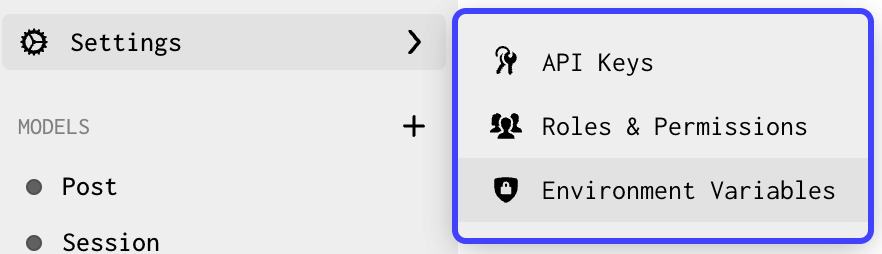
In order to add new environment variables, or to see the variables that I currently have in my app, I can go to Settings → Environment Variables.
Now I click Add Variable to start adding variables. Environment variables have a key and a value. I’m going to call my first environment variable <inline-code>TWILIO_ACCOUNT_SID<inline-code>. Now I can paste my account SID value into the value field.
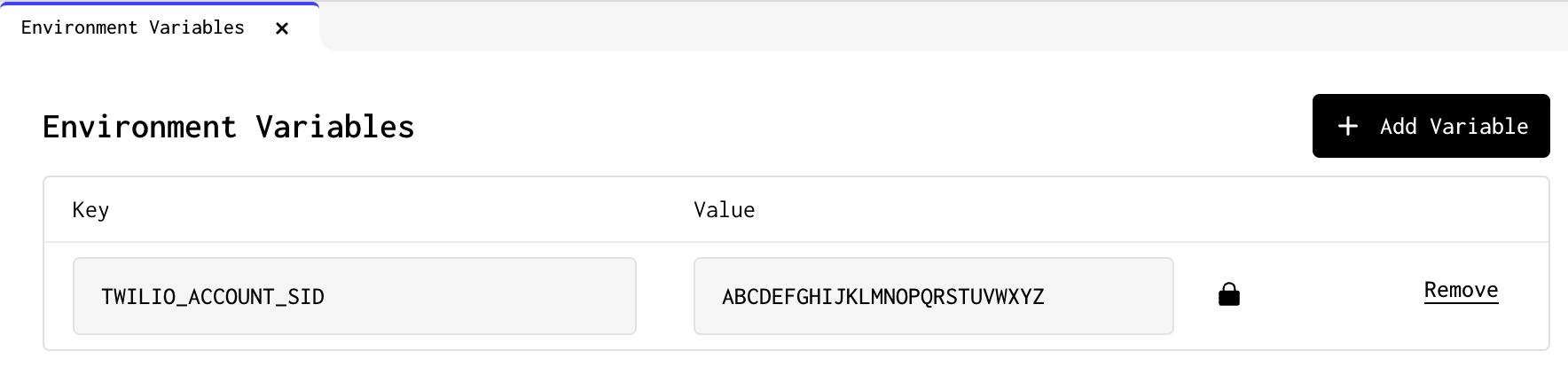
If a variable’s value is sensitive and not something I want to be visible in Forgelivo, I can click the lock button to encrypt the value and hide it from sight. Note that there is no way to see the value after it is encrypted! If I want to edit my value I will need to click the edit button in order to overwrite the existing value.

I can repeat the process for my <inline-code>TWILIO_AUTH_TOKEN<inline-code> and now have a secure way to create my Twilio client.

Using environment variables in code

The last step is to actually use my environment variables. Forgelivo uses Node.js under the hood, and I can access my environment variables the same way I would read them in any other Node project.

<inline-code>process.env.KEY<inline-code>

I can replace my hard-coded values in my code sample above:


And that’s it! My Twilio client can now be used to send SMS messages. If I also set up a Shopify Connection in Forgelivo, I can use a Code Effect to trigger this code snippet every time a product is sold on my store.

Environment variables are available for use in all Forgelivo projects. For more details on how to use environment variables in Forgelivo, check out the documentation.

Author details pending
[Author details pending]
Author
Reviewer
Try Forgelivo
See the difference a full-stack development platform can make.
Create app
No items found.

Shhhh! Keeping secrets using environment variables in Forgelivo

Keep sensitive information safe and configuration away from your code using Forgelivo's built-in support for environment variables.
Problem
Solution
Result

Environment variables are the de-facto way of configuring a production application. Among other things, they can be used to set domain names, configure dynamic URLs, integrate and authorize existing services with an application, and keep sensitive information out of codebases.

Let’s say I have a new Shopify store and want to send myself an SMS message every time I sell a product so that I can stay on top of my sales. I’m also a developer, so I know I can integrate SMS messaging into an application.

I could write my own SMS messaging service.

I could also learn to do a backflip.

Both take time and effort, and would probably be accompanied by some sort of unnecessary pain along the way. I can use a product like Twilio to send SMS messages instead. In order to use the Twilio client, I need to provide variables that handle authorization for me so that my messages can be sent.

To avoid this pain and make my configuration easy to change, Forgelivo allows me to inject environment variables into an application.

How it works

I'm going to use Twilio to send a message whenever I sell a product on my Shopify store. The code to do this is very simple.


I need to provide an account SID and an auth token when initializing a new Twilio client in order to connect to my Twilio account. Instead of hard-coding these values insecurely in my effect file, I should create environment variables in Forgelivo.

In order to add new environment variables, or to see the variables that I currently have in my app, I can go to Settings → Environment Variables.

Now I click Add Variable to start adding variables. Environment variables have a key and a value. I’m going to call my first environment variable <inline-code>TWILIO_ACCOUNT_SID<inline-code>. Now I can paste my account SID value into the value field.

If a variable’s value is sensitive and not something I want to be visible in Forgelivo, I can click the lock button to encrypt the value and hide it from sight. Note that there is no way to see the value after it is encrypted! If I want to edit my value I will need to click the edit button in order to overwrite the existing value.

I can repeat the process for my <inline-code>TWILIO_AUTH_TOKEN<inline-code> and now have a secure way to create my Twilio client.

Using environment variables in code

The last step is to actually use my environment variables. Forgelivo uses Node.js under the hood, and I can access my environment variables the same way I would read them in any other Node project.

<inline-code>process.env.KEY<inline-code>

I can replace my hard-coded values in my code sample above:


And that’s it! My Twilio client can now be used to send SMS messages. If I also set up a Shopify Connection in Forgelivo, I can use a Code Effect to trigger this code snippet every time a product is sold on my store.

Environment variables are available for use in all Forgelivo projects. For more details on how to use environment variables in Forgelivo, check out the documentation.

Interested in learning more about Forgelivo?

Join leading agencies making the switch to Forgelivo and experience the difference a full-stack platform can make.